iPhone and Android
Track your USCIS and DOL cases on your phone
Add USCIS receipt numbers, PERM and LCA case numbers, and the visa bulletin categories you follow. The app shows each case's latest status and how long it has been there. For USCIS cases it also shows how long similar cases usually take.
Coming soon
App Store and Google Play
The app uses your mycaseshub.com account. Sign in with the same email and your USCIS and DOL cases are there.
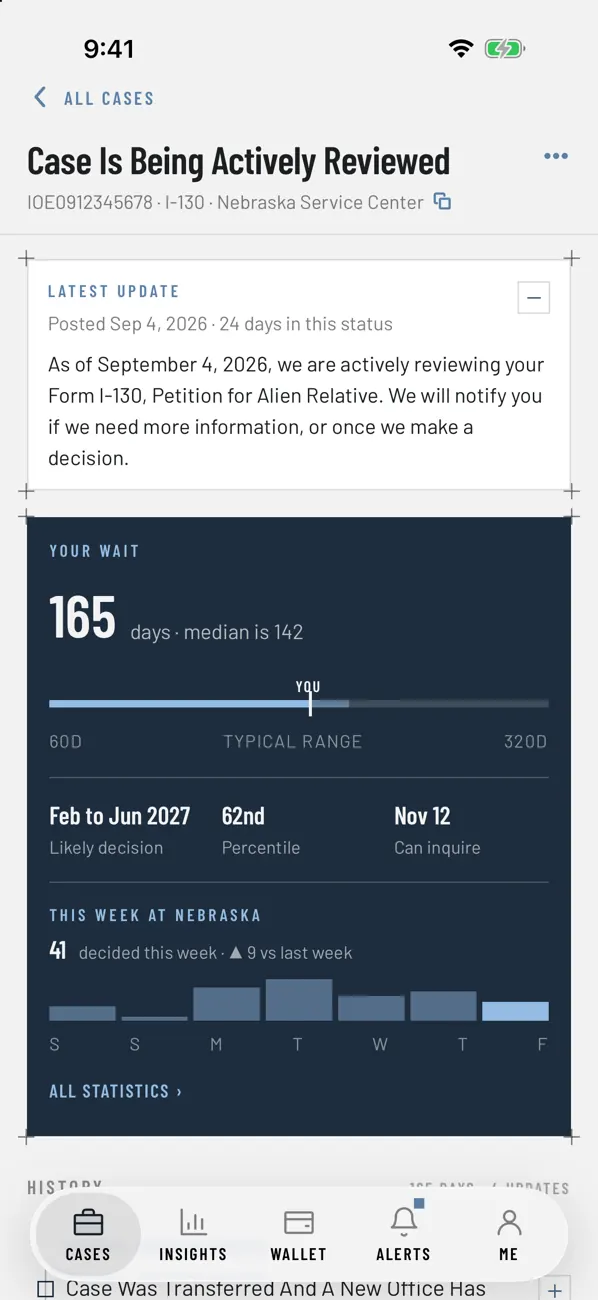
In the app
What the app does
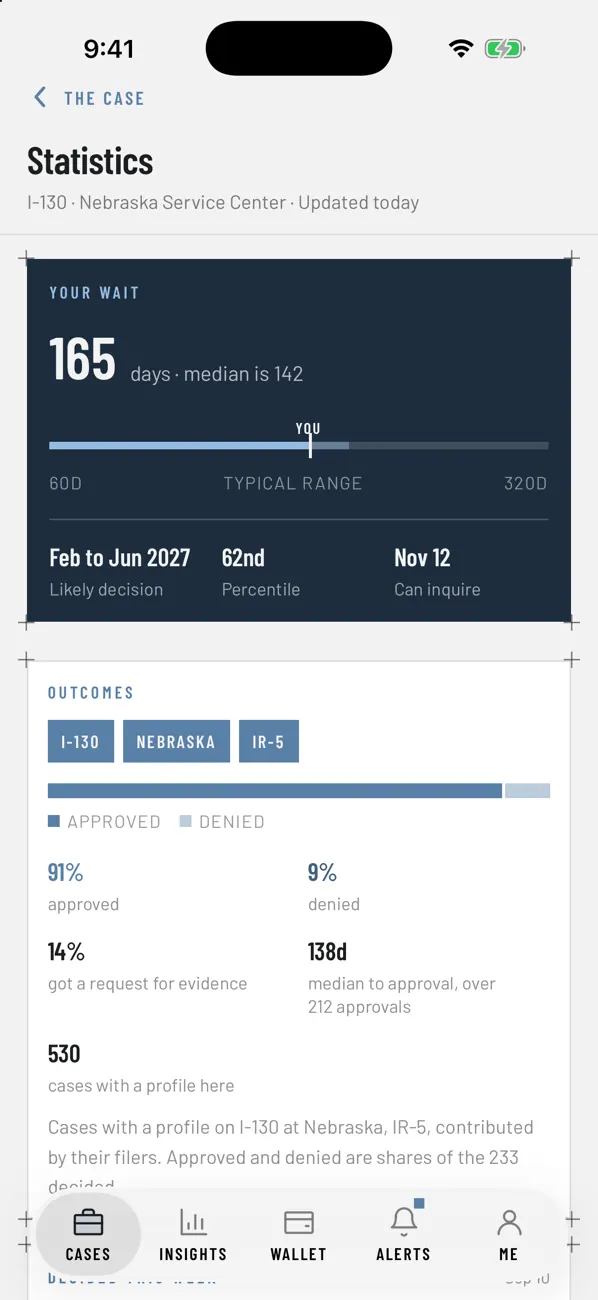
Statistics
How long cases like yours take
For USCIS cases: your wait next to the typical range for the same form and office. More figures open on Lite and Premium.
Add a case
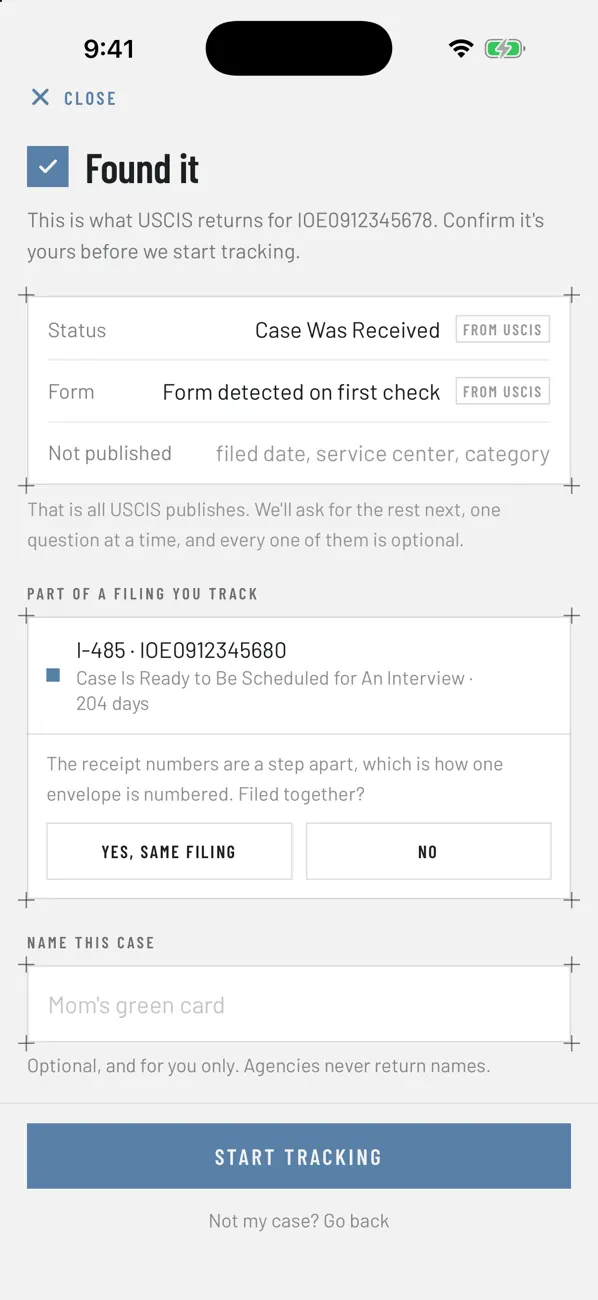
Check a number before you track it
Type a receipt number and see the case's latest USCIS status. Tracking starts only after you confirm the case is yours.
Wallet
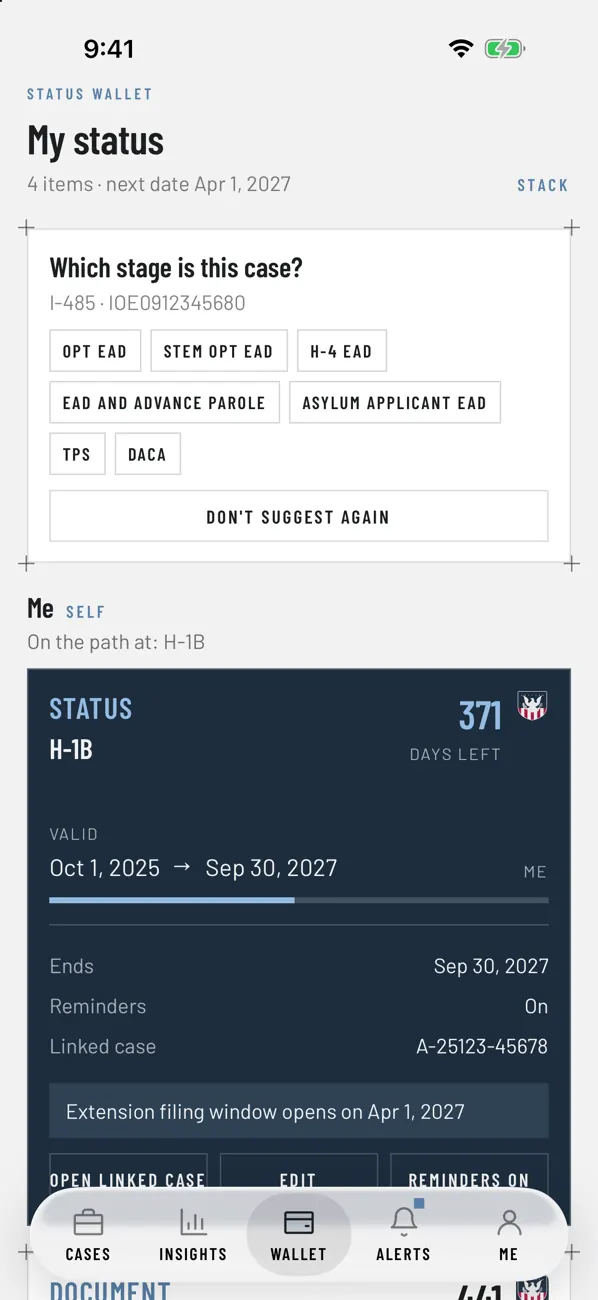
Your status and its dates
Keep visas, work permits, I-94 records, and passports for you and your family. Reminders show in the Alerts tab, and come by email on Lite and Premium.
Alerts tab
Status changes on your USCIS and DOL cases and Wallet dates that come due, from the last 30 days, newest first.
Email
Status change emails for the cases your plan includes, and Wallet reminder emails on Lite and Premium. You can turn both off in the app's notification settings.
Widgets
Home screen widgets for a case you pick, your latest change, or your next Wallet date.
Screens show sample data. The case and statistics screens are from a Premium account.
How it works
From a receipt number to updates
Sign in
With Google, with Apple on iPhone, or with a code we email you. Use the email on your mycaseshub.com account to see the cases you already track. With Apple, choose Share My Email.
Add a number
A USCIS receipt number, or a PERM or LCA case number. Or pick a visa bulletin category to follow.
Confirm it
For a case number, the app shows the latest status it has, and tracking starts once you confirm the case is yours. For a visa bulletin category, it shows the current final action date.
Follow it
Changes show in the Alerts tab, and by email for the cases your plan covers.
Your data
Receipt numbers are personal information
- We treat the receipt numbers you add as personal information. We use them to show you your cases, check them with USCIS, tell you about changes, compare your case with similar cases, and stop abuse.
- The app has no advertising, analytics, or tracking code from other companies.
- We do not sell your data.
- You can delete your account in the app. We close it at once and permanently delete your personal data within 30 days, backups included, apart from the records section 12 of the policy lists.
Questions
About the app
When will the app be available?
Soon, in the App Store and Google Play.
Is MyCasesHub part of USCIS?
No. MyCasesHub, Inc. is a private company and is not affiliated with USCIS or any government agency. Case statuses come from the agencies' own case status systems.
Do I need a new account?
No. Sign in with the email you use on mycaseshub.com and your USCIS and DOL cases are there. With Apple on iPhone, choose Share My Email so the app can find your account. Law firm accounts are separate and do not work in the app.
What does it cost?
The app is free to download, and your MyCasesHub plan applies in it. The Free plan tracks 3 cases. More cases and some statistics need Lite or Premium.
Does the app give legal advice?
No. It shows case information and statistics. For advice about your case, talk to an immigration attorney.
How do I delete my account?
In the app. We close the account at once and permanently delete your personal data within 30 days, backups included. Section 12 of the Mobile Privacy Policy lists what is deleted and what stays.